
Footers will be soon eliminated because new themes can do this job too and better.
You can use theme enhancer to implement this already:
Yes new themes can do it better but modifying the entire theme for small changes would be too much and sometimes AI mess things up instead of making it better.
So why not rename footers to HTML blocks and make them available in Theme editor or enhancer. This way users can select html blocks and position them differently within the theme (that too by using AI). So, if user want to make minor updates (like adding or updating a small portion of text) they can do so within HTML blocks instead of editing the entire theme. They can also group multiple fields in the HTML blocks, and by simply positioning that block, they can position that whole set of fields anywhere in the theme.
2 Likes
@lubos Footer was helpful it gives us more flexibility to choose specific information especialy for sales invoices
can you please address how we will be able to get bank information in with enhanced themes
I have one of the customer who has different bank account in different currencies, he use footer to choose which bank account will appear in the invoice to collect payment from customers he has 2 bank with 3 different account in EUR, SAR and USD. we use footer to choose bank account based on customer set up currency in customer tap.
Looking forward to receive your feedback for this case
1 Like
You can use a combination of Custom Fields and Themes, however, I can see how Footers can be an easier option here.
Personally, I like @shahabb’s idea of HTML blocks, in this case, I would also recomnend combining them all together as a single thing instead of their current split.
1 Like
You can have custom fields on business information screen and those would be visible by theme enhancer. But I think theme enhancer will get much better. What we have now is really version v0.1 just to show it works. For example you still can’t edit existing themes with it but that is coming very soon. Then we see what’s missing and how to make it really good.
I prefer if we don’t have redundant functionality in Manager so the program is simpler rather than having multiple competing solutions to the same problem.
This is will be very easy. Either you tell theme enhancer - if currency is ABC then bank details are XYZ. Or you could create custom field on Foreign Currency screen and then theme enhancer can pull bank information from the custom field of used foreign currency. I think just telling theme enhancer will be easier because there are not that many foreign currencies so they might as well be hardcoded in the theme.
That fine as long as the Theme Enhancer is properly trained. Issue i am concerned about is that Theme enhancer can help us modify things even make calculations but sometime its too naive and modify the code to get what was demanded. But if in future that transaction get another field which was not available when the code was written it misses that or make the whole view distorted.
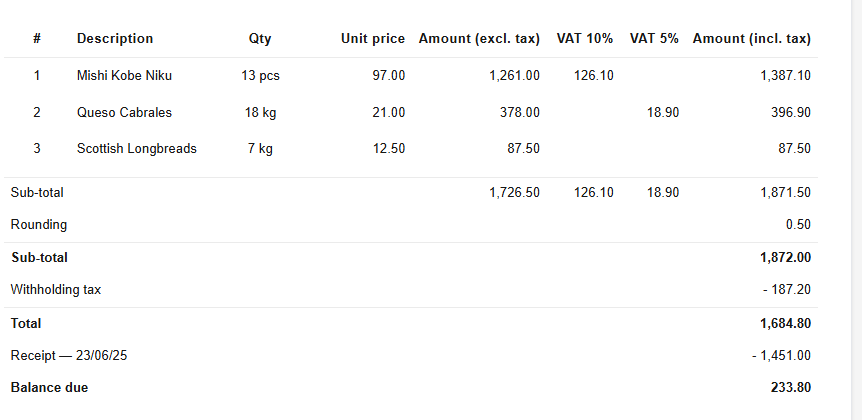
In the picture above i wanted to display each tax code as a column. So it was fine until it got another tax code which wasnt mentioned in the theme code.

Here Some+Other tax code was added then it started to show that in the sub-totals and also pushed the Amount incl tax (Total column) to the right.
What i mean is it can cause issue during production environment unless you tune the code for every possible scenario.
I know about this issue. I want to make default theme AI friendly but it will slightly change default look of invoices. I didn’t want to push all those little changes all at once.
Also, theme enhancer is going to be improved a lot next month.
There is one other thing which i dont know if i should create a new topic for it.
We need tax amount per component of tax code per item. Currently the subtotals can show total per component but we dont know amount of each tax component per item. That way we can show each component as a column.
Previously this would be another checkbox or more. Now I can just expose all the data to theme and theme enhancer can leverage it if user desires. So yeah - I can expose tax amount per tax component. That’s not an issue.
3 Likes
@Lubos you may also consider applying theme enhancer to reports
@lubos Theme enhancer to reports would be great too. Or maybe a custom report that uses script (written with AI) to extract figures and create reports within manager without the need for extension.
I’m planning to roll out custom themes for all View screens. When you think about it, many country-specific tax reports is just “different” view over generic Tax Summary. And if these reports can be authored using LLM tools without any coding, then perhaps this is the solution to bring country-specific tax reports to all countries.
Auditing the code to ensure it complies with tax office requirements for all cases is likely to be a formidable hurdle. Getting it to appear ok for a few tests cases is the more likely outcome.
2 Likes