zeem
January 13, 2025, 1:14pm
1
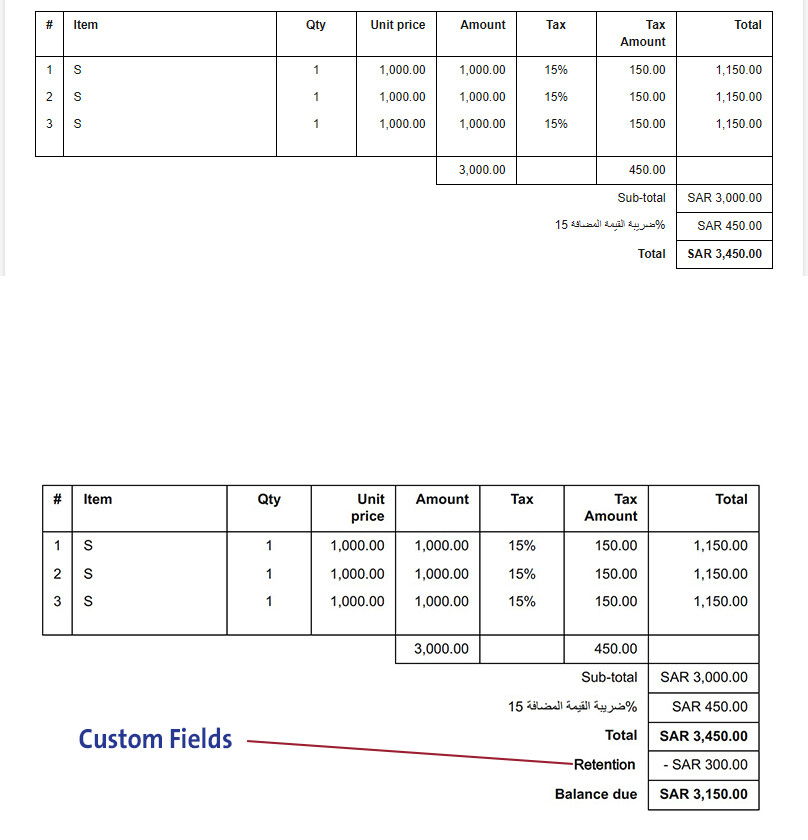
"I created a custom field called Retention, which should appear on the invoice below the total. I also want to display the balance, which is the difference between the Retention and the total. The Retention value is dynamic and entered when creating the invoice.
I got stuck on how to add a footer that specifies where the Retention should appear in the invoice, as well as the balance. Is this possible?"
eko
January 13, 2025, 1:25pm
3
As @Joe91 mentioned, no this is not possible. Custom fields relate to data entry columns, see https://www.manager.io/guides/custom-fields see Utilizing Custom Fields
Manager can not include custom fields in any calculation and therefore also not in any totals column.
zeem
January 13, 2025, 1:30pm
4
<table style="padding: 30px; width: 100%">
<thead>
<tr>
<td colspan="99">
<table style="margin-bottom: 20px; width: 100%"><tr>
<td style="font-weight: bold; font-size: 32px; vertical-align: top">{{ title }}</td>
{% if business.logo != null %}<td style="text-align: end"><img src="{{ business.logo }}" style="max-height: 150px; max-width: 300px; display: inline" /></td>{% endif %}
</tr></table>
<table style="margin-bottom: 20px; width: 100%"><tr>
<td style="vertical-align: top">
<div style="font-weight: bold">{{ recipient.name }}</div>
<div>{{ recipient.address | newline_to_br }}</div>
<div>{{ recipient.identifier }}</div>
</td>
<td style="text-align: end; vertical-align: top">
{% for field in fields %}
<div style="font-weight: bold">{{ field.label }}</div>
<div style="margin-bottom: 10px">{{ field.text }}</div>
{% endfor %}
</td>
{% if business.address != null %}
<td style="width: 20px"></td>
<td style="width: 1px; border-left-width: 1px; border-left-color: #000; border-left-style: solid"></td>
<td style="width: 20px"></td>
<td style="width: 1px; white-space: nowrap; vertical-align: top">
<div style="font-weight: bold">{{ business.name }}</div>
<div>{{ business.address | newline_to_br }}</div>
{% for field in business.custom_fields %}
<div>{{ field.label }} {{ field.text }}</div>
{% endfor %}
</td>
{% endif %}
</tr></table>
<div style="font-size: 14px; font-weight: bold; margin-bottom: 20px">{{ description }}</div>
</td>
</tr>
<tr>
{% for column in table.columns %}
<td style="writing-mode: horizontal-tb; border-inline-start-width: 1px; border-inline-start-style: solid; border-inline-start-color: #000; {% if forloop.last == true %} border-inline-end-width: 1px; border-inline-end-style: solid; border-inline-end-color: #000{% endif %}; text-align: {{ column.align }}; font-weight: bold; padding: 5px 10px; border-bottom-width: 1px; border-bottom-color: #000; border-top-width: 1px; border-top-color: #000; border-top-style: solid; border-bottom-style: solid{% if column.nowrap %}; width: 80px{% endif %}">{{ column.label }}</td>
{% endfor %}
</tr>
</thead>
<tbody>
{% for row in table.rows %}
<tr>
{% for cell in row.cells %}
<td style="writing-mode: horizontal-tb; border-inline-start-width: 1px; border-inline-start-style: solid; border-inline-start-color: #000; {% if forloop.last == true %} border-inline-end-width: 1px; border-inline-end-style: solid; border-inline-end-color: #000{% endif %}; padding: 5px 10px; text-align: {{ table.columns[forloop.index0].align }}; {% if table.columns[forloop.index0].nowrap %}; white-space: nowrap; width: 80px{% endif %}">{{ cell.text | newline_to_br }}</td>
{% endfor %}
</tr>
{% endfor %}
<tr>
{% for column in table.columns %}
<td style="writing-mode: horizontal-tb; border-inline-start-width: 1px; border-inline-start-style: solid; border-inline-start-color: #000; {% if forloop.last == true %} border-inline-end-width: 1px; border-inline-end-style: solid; border-inline-end-color: #000{% endif %}; border-bottom-width: 1px; border-bottom-color: #000000; border-bottom-style: solid"> </td>
{% endfor %}
</tr>
{% for total in table.totals %}
<tr>
<td colspan="{{ table.columns | size | minus: 1 }}" style="text-align: end; padding: 5px 10px{% if total.emphasis == true %}; font-weight: bold{% endif %}">{{ total.label }}</td>
<td style="border-left-width: 1px; border-left-style: solid; border-left-color: #000; border-right-width: 1px; border-right-style: solid; border-right-color: #000; text-align: right; white-space: nowrap; border-bottom-width: 1px; border-bottom-color: #000000; border-bottom-style: solid; padding: 5px 10px{% if total.emphasis == true %}; font-weight: bold{% endif %}">{{ total.text }}</td>
</tr>
{% endfor %}
<!-- سطر فارغ بعد الإجمالي -->
<tr>
<td colspan="99" style="padding: 0;"></td>
</tr>
<!-- إضافة "Retention" أسفل الإجمالي مع التصاق المبلغ-->
<tr>
<td colspan="{{ table.columns | size | minus: 1 }}" style="text-align: end; padding: 5px 10px; font-weight: bold; border-top: none; border-bottom-width: 1px; border-bottom-color: #000; border-bottom-style: solid;">
Retention
</td>
<td style="text-align: right; padding: 5px 10px; border-left-width: 1px; border-left-style: solid; border-left-color: #000; border-right-width: 1px; border-right-style: solid; border-right-color: #000; border-bottom-width: 1px; border-bottom-color: #000; border-bottom-style: solid;">
300.00
</td>
</tr>
{% for field in custom_fields %}
<tr>
<td colspan="99">
<div style="font-weight: bold; padding-top: 20px">{{ field.label }}</div>
<div>{{ field.text | newline_to_br }}</div>
</td>
</tr>
{% endfor %}
<tr>
<td colspan="99">
{% if emphasis.text != null and emphasis.positive %}
<div style="text-align: center; margin-top: 40px"><span style="color: #006400; border-width: 5px; border-color: #006400; border-style: solid; padding: 10px; font-size: 20px">{{ emphasis.text | upcase }}</span></div>
{% endif %}
{% if emphasis.text != null and emphasis.negative %}
<div style="text-align: center; margin-top: 40px"><span style="color: #FF0000; border-width: 5px; border-color: #FF0000; border-style: solid; padding: 10px; font-size: 20px">{{ emphasis.text | upcase }}</span></div>
{% endif %}
</td>
</tr>
</tbody>
</table>
It was entered through the Themes and worked, but not everything is complete
eko
January 13, 2025, 1:33pm
5
Custom themes are under obsolete features and therefore no longer supported or updated.
zeem
January 13, 2025, 1:40pm
6
“If it’s possible to edit the Themes, I believe that adding it through footers to specify the location of the discount and retrieving the data from the custom field would work I will try again Thank you.”
Let see if this work
<span id="retention-value" style="display: none;">%%Retention%%</span>
<script>
	document.addEventListener('DOMContentLoaded', () => {

    const retentionPlaceholder = document.getElementById('retention-value').textContent.trim();
    const retentionValue = parseFloat(retentionPlaceholder.replace(/[^0-9.]/g, '') || 0);

    if (isNaN(retentionValue)) {
        return;
    }
	const totalRow = document.querySelector('tbody tr:nth-last-of-type(2)');
    const totalValueCell = totalRow.querySelector('td[data-value]');
    const totalValue = parseFloat(totalValueCell.dataset.value || 0);
    const totalText = totalValueCell.textContent.trim();
    const currencyMatch = totalText.match(/^[^\d\s]+/);
    const currencyCode = currencyMatch ? currencyMatch[0].trim() : '';

	const retentionRow = document.createElement('tr');
    const retentionLabelCell = document.createElement('td');
    retentionLabelCell.colSpan = 3;
    retentionLabelCell.style.textAlign = 'end';
    retentionLabelCell.style.padding = '5px 10px';
    retentionLabelCell.style.fontWeight = 'bold';
    retentionLabelCell.textContent = 'Retention';

	const retentionValueCell = document.createElement('td');
    retentionValueCell.style.textAlign = 'right';
    retentionValueCell.style.whiteSpace = 'nowrap';
    retentionValueCell.style.border = '1px solid #000';
    retentionValueCell.style.padding = '5px 10px';
    retentionValueCell.style.fontWeight = 'bold';
    retentionValueCell.textContent = `${currencyCode} ${retentionValue.toLocaleString('en-US', { minimumFractionDigits: 2 })}`;
    retentionRow.appendChild(retentionLabelCell);
    retentionRow.appendChild(retentionValueCell);
    totalRow.parentNode.insertBefore(retentionRow, totalRow.nextSibling);

	const balanceDueValue = totalValue - retentionValue;
    const balanceRow = document.createElement('tr');
    const balanceLabelCell = document.createElement('td');
    balanceLabelCell.colSpan = 3;
    balanceLabelCell.style.textAlign = 'end';
    balanceLabelCell.style.padding = '5px 10px';
    balanceLabelCell.style.fontWeight = 'bold';
    balanceLabelCell.textContent = 'Balance Due';

	const balanceValueCell = document.createElement('td');
    balanceValueCell.style.textAlign = 'right';
    balanceValueCell.style.whiteSpace = 'nowrap';
    balanceValueCell.style.border = '1px solid #000';
    balanceValueCell.style.padding = '5px 10px';
    balanceValueCell.style.fontWeight = 'bold';
    balanceValueCell.textContent = `${currencyCode} ${balanceDueValue.toLocaleString('en-US', { minimumFractionDigits: 2 })}`;
    balanceRow.appendChild(balanceLabelCell);
    balanceRow.appendChild(balanceValueCell);
    retentionRow.parentNode.insertBefore(balanceRow, retentionRow.nextSibling);

	const scriptElement = document.currentScript;
	if (scriptElement) {
		scriptElement.remove();
	}
});
</script>
@zeem , why not just create a Sales Order or Sales Quote and use progressive billing against that?
This way you only bill what is due for payment and bill the retention amount when it’s finally due?
zeem
January 14, 2025, 6:03am
10
Thank you very much WORK 100%
zeem
January 14, 2025, 7:09am
11
Use this in construction accounting, and I prepare a journal entry for it