Manager 25.10.13.2977 desktop, Win11, froze yesterday. Will try the new version 2983 today.
My Manager GUI froze after 57 minutes of usage, I’m running ManagerDesktop version 25.10.14.2983 on Windows 11 Pro 25H2 26200.6725.
Note: upon freezing the API1 is also not accessable anymore through the browser.
I keep up with all the updates that the developer is making I keep up with all updates issued by the developer. Especially when there are many features. But the freezing and lack of response in the program,especially after an hour of using this manager,is annoying. My old version 24.10.14.1886. Honestly,there was no freezing in it and it responded to work for harsh and prolonged periods. Now with the release of 25.10.17.3004 we will get into the freezing and nonresponsive problem. With better features than before.
Desktop Manager 25.10.20.3008 on Windows 11 24h2. Manager froze when NOT editing. I had 2 tabs open. After it froze I copied a link to see if I could access Manager via the web browser, but it didn’t work.
Is there anything one can look for, perhaps in the Task Manager or something similar to see what is hanging?
@pau when you launch desktop edition, in task manager confirm you see ManagerServer

Then when desktop edition freezes, have a look whether ManagerServer is still running.
1 Like
Same issue since v25.10.2.2864 ‘Desktop Edition’:
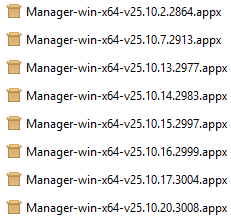
Even until v25.10.30.3008 it freezes.
Yes I’ve got ‘ManagerServer.exe’ running:

Second, why are ‘so many’ services (5x Manager.exe, 1x ManagerServer.exe) loaded? In this example I only got one tab open. While it freezes, ‘ManagerServer.exe’ is indeed disappeared from the list.
Third, before the new layout and such, the application was quicker and more responsive too.
5x Manager.exe is actually Electron. It’s the same when you open Google Chrome and see multiple Chrome entries even if you have just 1 tab open. Both Manager and Google Chrome are using the same underlying technology.
Thanks. This is good indicator why it is freezing. If you manually terminate ManagerServer.exe rather than waiting for it to crash, you will be able to reproduce the freeze.
ManagerServer.exe sometimes is listed under Background processes. I’m pretty sure it was still running last time Manger froze, but will check again and confirm. When terminating ManagerServer.exe the whole program closes after clicking the “Manager crashed” error box. Previously when Manager froze one could still copy hyperlinks from the screen, or switch tabs, so not quite an equivalent freeze.
I’ve added this to the latest version today. I want to see whether process exits for whatever reason or whether freezing occurs without process exiting.
1 Like
I’m not sure if this will help troubleshoot the freezing issue but I have noticed that using undo in History causes the app to freeze.
I just encounter a freeze v25.10.20.3008:

This time the process ‘ManagerServer.exe’ still exists.
When I than manually kill the process ‘ManagerServer.exe’ the application still runs, but no ‘waiting’ tabs anymore and the names are replaced by IDs. While trying to open a new tab, it looks for ‘127.0.0.1:55667’, but nothing happens of course obviously:
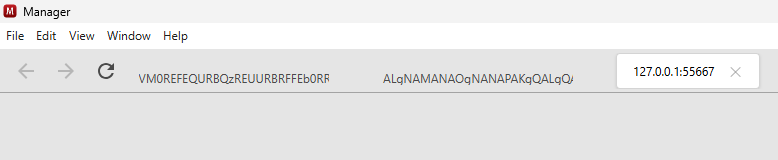
Hope this helps…
I’m able to reproduce freezing issue now.
The freezing issue has been fixed in the latest version (25.10.21.3012)
6 Likes
I have just downloaded version 25.10.31.3077 and I am still having issue with freezing.
Steps prior to freezing:
- Updated a receipt transaction
- Went to History and did an “Undo” on the updated transaction
- Went to Customers and cannot enter anything into the search field in Customer list.
- Closed Manager and reopen resolves.
That seems very specific. Were you able to navigate to different screens?
Previous issue has been that it wasn’t possible to navigate anywhere.
I’m experiencing a similar issue Went to History and did an “Undo” . The Search Input field appears to be locked or unresponsive when the tab is first opened. It only becomes usable after switching to another window and then returning to the Manager window.
Yes it is very specific - I’m only following the guidelines.
To more specific, after an “Undo” it is possible to navigate to all tabs and screens however the Search Fields in all modules will not take input. If a transaction is viewed or edited the fields become accessable again.
It is not that much of an issue but I am thinking that you would want to resolve it at some stage.
I can reproduce the issue. It’s not just search box, every text input field will stop working but clicking around will eventually make it work again. Not sure why Undo button triggers this issue. I’m pretty sure there might be more triggers but either way this looks like issue in Electron JS, not something specific Manager is doing. Not to mention, this issue is happening in desktop edition only.