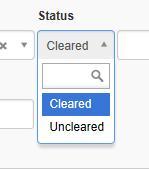
I have entered a few cheques by clicking on the “uncleared payments” column in the bank account. They appear in there with the word “uncleared” in the status column.
Now I want to clear them as they appear on the statement but can’t find where to do that.
When you select Cleared as @Brucanna noted, you also get the option of putting in a date. This isn’t mandatory, but it may help for various purposes later to have the transaction date and the bank clearance date. Entering a clearance date does not affect the initial transaction date.
Thank you for your responses. I’m wondering if I have a setting to adjust as when I go to the uncleared transactions and click edit on the ones that need to be cleared I don’t get that option. Am trying to insert a screen print bit does not work? I have seen on examples that next to the Account, Amount and Tax line there should be the Uncleared/Cleared box but it is not there.