Duplicate Display of Past Sales Invoices Causing Incorrect Summary Totals (Bug)

Hello
I am using the cloud version 25.11.27.3143.

In the Transactions tab, when selecting a budget line and viewing the related transactions, some invoices appear duplicated. This duplication is causing incorrect totals in the Summary tab.

As shown in the screenshot, the system displays two sales invoices with reference 15—one with a date and another without a date.

This issue affects all past bulk transactions, with around 50 sales invoices showing the same duplication problem. This issue did not exist two days ago when I last reviewed the summary of my business.

Additionally:

  • Some duplicated invoices show different balances. For example, invoice #142 appears twice with different debit amounts: 675 and 925.

  • The mistaken duplicated invoices are shown in the debit column, whereas their value should be 0.

  • We also discovered that this issue is reflected in the Customer tab transactions as well.in the example bellow the amount of customer should be 200 $ but with this bug I’m getting 0 $

All the number is Summary Tab is wrong
everything that is realted to purchase invoice or sales invoice is wrong and this is frustating
All our Nymbers is wrong and we can not move on with work

You mention that these are bulk transactions.

Does that mean that the [Batch Create] option was used? It is noticeable that there are transactions without a date, which is obviously not correct.

The question is whether the system has a bug or whether the user attempted to add invalid data to the system.

How did you enter the transactions? Check [History], maybe then you can see what happened.

At first, I thought it was the batch update button the problem but I found that other transactions made recently has the same problem.

If you go to the customer Tab, the balance of a customer is way different than the amount for the same customer when you to this transaction though the summary Tab - accounts receivable - name of the customer

Plus there is no missing data, the same invoice (sales of purchase) is shown twice (once with full data and other time with missing data which is making the problem) and if you to try to delete one of the transactions , both will be delete

And if you recreate the invoice the same issue will reform
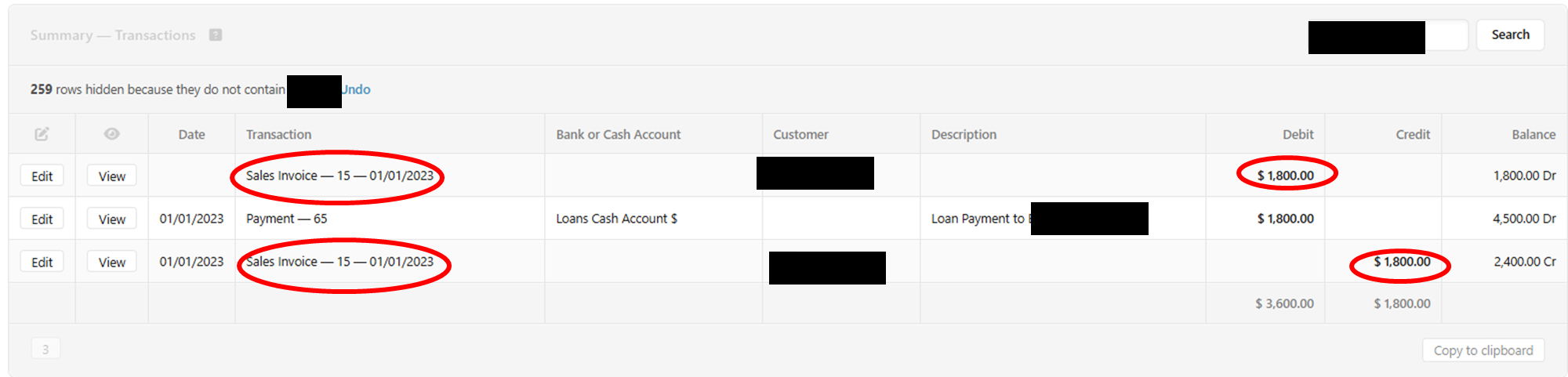
It is obvious from your screenshots you are drilling down via the Summary Screen.

You have the Summary set to report on a “Cash Basis”.

The items in your screenshots that do not have a date are Cash Basis adjustments so that the Summary Screen displays correctly as a Cash Basis report.

A Cash Basis report will not show what your customers owe as Accounts Receivable (and Accounts Payable) are not included in a Cash Basis report.

An Accrual Basis report will show the Customer (Supplier) amounts owed.

It frustrates me that the Moderators and/or developer have not replied to your query to explain this.

3 Likes

Thank you AJD.

Actually that fixed my problem by only untucking the cash basis checkbox in summary settings

This is my 10th year using the software and that issue drove me crazy yesterday.

Appreciate it

1 Like