Behavior
See screenshots below - when going into a report type, they aren’t sorted oldest to newest anymore. I’m not sure what the ordering is. I chose not to stare too long at it.
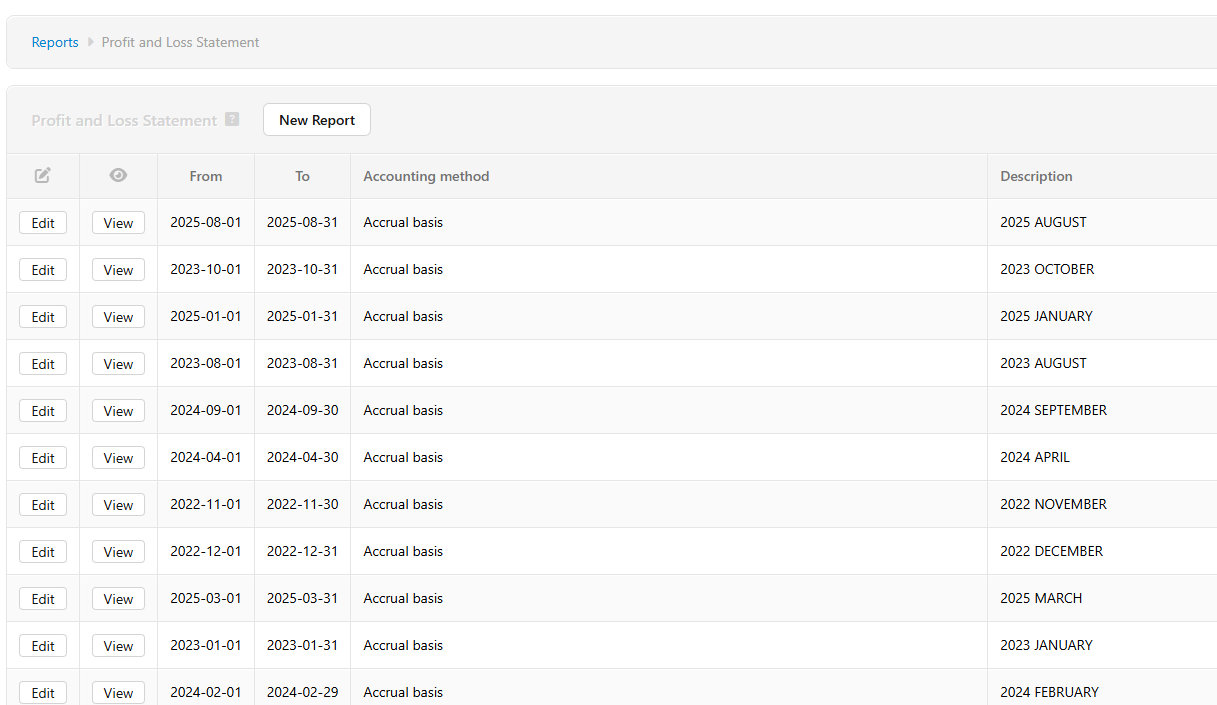


Expected Behavior
Reports should be sorted in order of vintage/creation (in my case, by month and year chronologically). That’s how they used to be before this update.
Detail/Background
This might be related to Switching desktop edition to Electron platform - Manager Forum but I thought this better in its own thread if it’s a me issue.
Manager Desktop on Windows, 25.9.28.2843. My date format is yyyy-MM-dd though I doubt that matters.
I noticed this very recently and I manually update Manager about once a week. I also noticed since updating to this version that some of the layout/UI has changed in minor ways. Maybe related, idk.
I haven’t yet tried to downgrade (or upgrade for that matter) to ground my assumption that this broke in a newer version of Manager.