@lubos Previously it was possible to easily create a new (and similar) business by duplicating an existing business and then deleting the transactional data and its history in the copied business. With the new backup process, this is no longer possible due to the fact that history cannot be deleted. This seems to be a retrograde step as it now means that each new business will need to be completely setup anew. The fact that a chart of accounts can’t be imported makes this process even less satisfactory. Are there any plans to reincorporate the history deletion feature in Manager?
@ozcpa in Backup go to  Export

Select date from the very beginning and Export

Now Import Business
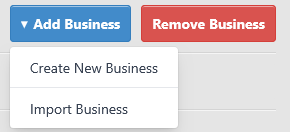
Click on 

Uncheck 

No History All Done
Many thanks … you are perfectly correct. The “Export” button was so small on my system that I didn’t even notice it. You have better eyes than me 
Unfortunately the ‘Export’ button has since been removed for some reason and so we are back to square one. Quickbooks certainly used (not used Quickbooks for years now) to have ‘Purge‘ to remove older transactions which is the equivalent of the Manager.io ‘Export‘ button. It is a shame all the Backup options have been removed for although it is a perpetual accounting system (like Quickbooks certainly was) you do want to manage the database and can also refer back to an older copy for historical data. It is disappointing that great features that existed concerning ‘Backup’ and ‘Export’ have been removed.