I’m getting the message when issuing an invoice, even though the ZATCA status shows CLEARED.
Is this because I need to restart the Business Data? And if I do, will I need to reconnect the business again?

This message seems to indicate that users without access to business details are still trying to submit invoices to ZATCA. This can complicate error handling because references from ZATCA may fail to save in the manager.
Have you tried using an administrator account? If the administrator also encounters issues, check the access token. It’s possible that the access token registered during onboarding was accidentally deleted. If that is the case, you will need to restore it via the history.

Yes, the issue occurs even when using the administrator account
Regarding the possibility of the access token being accidentally deleted no, it was not deleted by mistake
However, I intentionally deleted it in the hope of receiving the update prompt and creating a new access token, but this attempt did not succeed
I then restored it from the history
I still need assistance with resolving this issue
You can try generating a new access token and updating it in the business details by following these steps:
- Go to Settings → Custom Fields → Text Custom Fields, then edit the field ZATCA Certificate Info.
- In the Description, add any character right after
<script>and update. - Create a new access token and copy the generated Token Secret.
- Open the Business Details settings, replace the old access token with the newly generated one, and save.
- Return to the ZATCA Certificate Info custom field and remove the extra character you added in step 2.
At this point, ZATCA should be using the new access token, and you can try resubmitting the invoice.
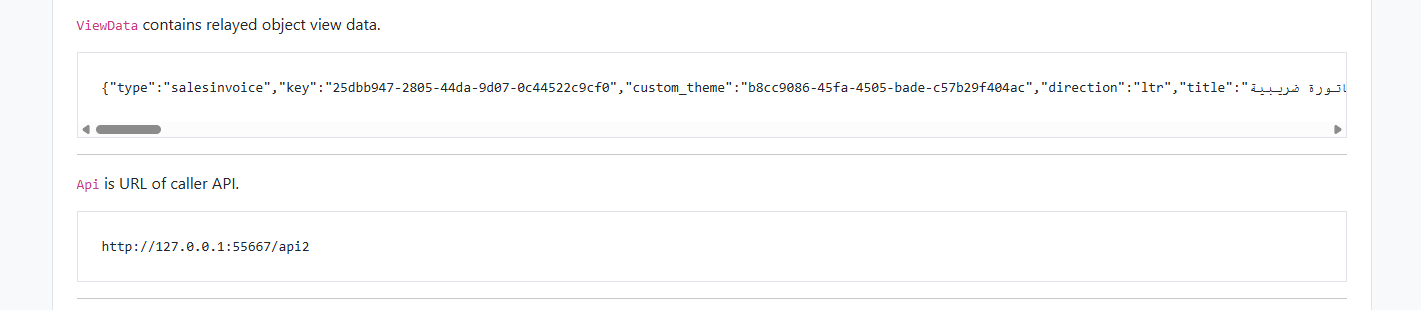
If the above method does not work, the issue might be that the relay data API does not match the URL shown in your browser. To confirm this, you need to change the relay on the invoice to https://relay.manager.io and then check the content of the API. Look at the “URL of caller API” and verify whether it matches the URL in your browser.
Thanks a lot for the clear steps, really helped me fix it quickly 