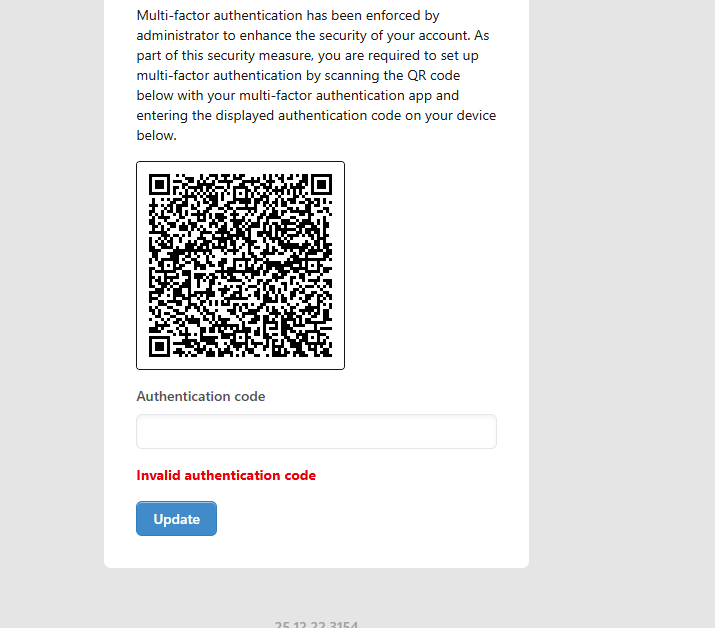
I have enforced authentication in one of the user accounts. I was trying to test if its fixed and working now but still, it never works.
When i input the code, it says invalid every time. I am using Google Authenticator.
I have enforced authentication in one of the user accounts. I was trying to test if its fixed and working now but still, it never works.
When i input the code, it says invalid every time. I am using Google Authenticator.
Hello @mraniweneonline
For the first time, log in after you have used the Google Authenticator. code
try to log out and re-login.
i face this everytime only for the first time login after enabling the Google Authenticator. to new user
I hope it can be fixed @lubos @Ealfardan
Thanks @Hazem i will try and revert
Yes, its something that has always persisted, even from before. And it’s something even you can replicate.
Try enabling a 2FA for the admin account you are using, then whenever you try 2FA it doesnt work, it just never works. Atleast it has never worked for me.
After enabling it gives you a qr code to scan
After scanning with my Google Authenticator app i try to put in the code it doesnt work. It never has
So i end up just disabling the 2FA
I have the same problem. But when I ignore the last screen and logoff and loggon with this new created 2FA code, it’s working fine. It’s also works for me when in the last step it says otherwise.
Hello @mraniweneonline,
Yes this is a buggy behaviour, but it’s not broken. The first time when the QR Code is shown, it only is a handshake between Manager and your Authenticator app.
You can see that you are already logged in.
The only thing to do at this stage is to ensure that Manager appears on your authenticator app and you are good to go.
I don’t think the Authentication code field does anything at this stage so its presense is confusing to the user.
A better option is to show a success message of some sort at this stage.
Once Manager has already been added to your authenticator app, the next time you login, you will see this screen instead:
Notice that this time around, I’m not logged in until I fill in the correct Authentication code.
Also there’s no QR code anymore.
Anyway, though benign, it has a place in bugs nonetheless and so I will escalate this to bugs.
Yeah, its more convenient to have it working the first time. Because you cant give all this explnation to every new user that they need to logout then login with the account to successfully use the 2FA code