@lubos ,for debit notes why can’t we have agood’s return instead of using agoods receipt and putting negative quanties to apply to mechanically complete the transaction. its becoming too mechanical
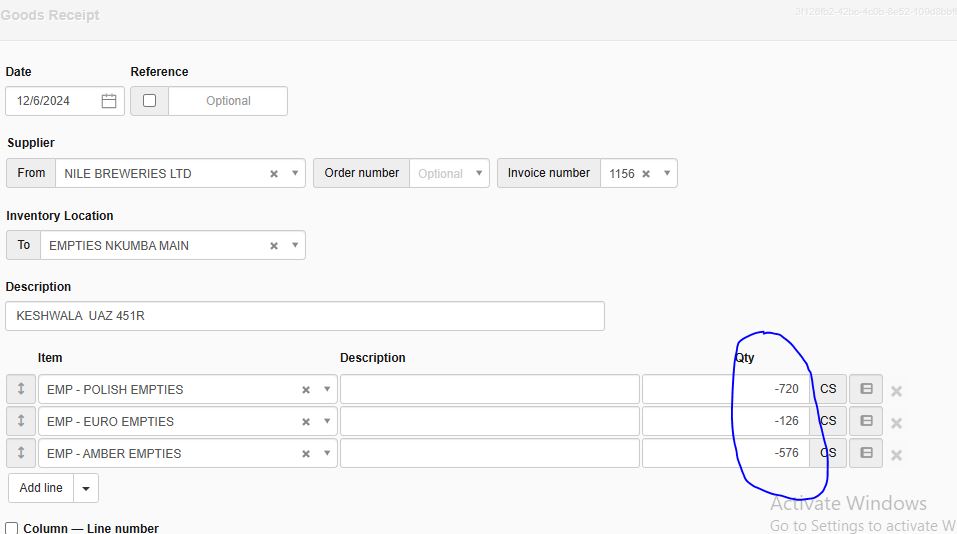
The screens are within the program. I’ve updated the original post with the new information.

Yes. Negative delivery note is customer physically returning goods back to your inventory.
I think the issue is that when copying credit note to delivery note, it doesn’t make the quantities negative by default. User has to make it negative. This is something that can be improved.
lubos, kindly create an option in in sales invoice in which we can create delivery note within new sales invoice so that for those people who are getting troubled due to increased work can easily operate this software including us as we were using it earlier, this way you will have the delivery note/ goods receipt necessarily implemented in your software as well as we will be able to use this software with ease as we were doing it earlier, I hope that this will solve the problem for all of us
@Saad_Zahid have you tried this option

at the bottom of Sales Invoice screen
.
yes I have done that but still we have to select location manually by going to each delivery note which takes a lot of time, that why I have recommended a very straight and simple way of combining both the things.
With all respects and regards to the developers
There can be benifits I dont understand
My situation in this regard is very blured
My intention of using an application is to reduce the work load, minimise time consumed for the job,using less man power
At this point I don’t understand how to cope up with the scenario other way round
Good Night every one:
Things work under the DNs batch creating; how ever, the GR still needs 1 by 1 copying to new GR which seems still a huge job.
So, I would suggest that:
- There is to be a way that enables us to automatically batch create all Qty to Receive to a new GR for all non- inventory location companies - because now it is where most of the trouble exists - we need automation rather than manual work.
- The System should auto- propose all previous Inventory locations for multi locations ( as 1st update was) where we can auto- create all Goods Received form at least each supplier.
In summary:
Delivery Notes auto-batch updated
Goods Receipts auto-batched updated
All GR & DN to auto cleared without Manual work.
This has been already implemented.
See this guide how: https://www.manager.io/guides?suppliers-qty-to-receive
However, I don’t understand this workflow. If you are batch creating delivery notes and goods receipts like this without checking whether items have been really delivered or received, then why even use Qty on hand column? Just use Qty owned column and no need to bother with any of this.
I often have a difference in QOH and QO where I have paid for an item that I am yet to physically receive, or have received an item that I am yet to pay for. All agreements state that ownership is not transfered until paid in full. Any discrepancy in the two indicates that one of them needs to be addressed.
Ownership does not indicate physical possession and vice versa.
The same principle applies to sales.
This new implementation is only adding extra work for those who used only invoices & orders, but not DN & GR.
And columns like “Qty available” was still useful when taking new orders from client for those businesses which just uses sales order & invoice.
We could just create multiple sales orders first based on “Qty available” column, & then after verifying physical qty we could convert those orders to sales invoices with same qty or few lesser qty if physical qty is not available because of some reason.
Current implementation is kind of forcing us to use DN & GR, as not using them indirectly affects Qty available column.
@lubos, do you have any suggestions for how to clear Qty reserved and Qty on order balances from transactions that were created before the recent updates, as per this post?
The Sales orders and Purchase orders creating those balances are linked to Sales invoices and Purchase invoices respectively. We have always been using Goods receipts, so the Purchase invoices are linked to those. I followed the batch update process described here to create the Delivery notes, but it looks like the Sales orders haven’t been affected. We have more than 3,000 Sales orders, so updating them manually would be a big job. We also don’t want to delete them all, as they give us useful job tracking history.
Please add Quantity Item in Sale Invoice .
it’s required for tax Purpose and some accounting purpose
hello @lubos
Again maybe am missing a point here . Am trying to look from the latest version of manager cloud version 24.6.30.1707, and i don’t see all these columns you have listed here . What i see is only reorder point which once clicked it gives “qty desired” . But all these other columns you mentioned here cant be seen. Is the system changing fast enough that we cant keep track of all changes or am i referring to the wrong guide ? Of course am trying to look for inventory columns - “Qty to receive” and “Qty to deliver” that we had in the last versions but now from the latest version neither these nor those columns you have mentioned here can be seen
Go to inventory Tab and at the bottom of the page click “Edit columns” from there you can select the columns you need.
Dear Lubos, We as a company , we do Purchase, Production, Sell, Inv Transfer Day to day basis. Our Team totally depend on your Could S/W.
Now a Days we can’t select Inventory Location both Purchase & Sell Invoices.
We can’t see inventory qty by location report
Our company is suffering it from last couple of weeks . Plz tell us what to do.
Its really affection our day to day business
@pcfgroup see