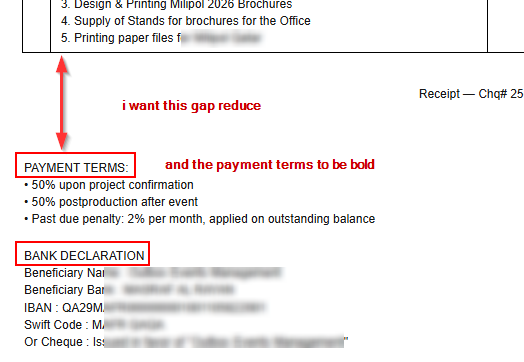
Hi @lubos i want these with marks to be updated in the template. where can i find in the code?
Use Theme enhancer. It will shift things around for you. But beware ….some times it doesnt listen (lol)…..I mean do as you want. So just be patient and exact as to want you require.
Or you could just include that as a “non inventory” item (in SETTINGS) and include in body of invoice as you create them.
You can find the code in Settings > Themes > New Theme
You want to do your changes, somewhere here:
			// TOTALS SECTION
			// Display subtotal, taxes, discounts, and grand total
			(data.table.totals || []).forEach(total => {
				const tr = document.createElement("tr");
				tr.className = 'total';

				// Label cell (e.g., "Subtotal:", "Tax:", "Total:")
				const tdLabel = document.createElement("td");
				tdLabel.innerHTML = total.label;
				tdLabel.colSpan = data.table.columns.length - 1; // Span all columns except last

				// Value cell (the amount)
				const tdValue = document.createElement("td");
				tdValue.innerHTML = total.text; // Formatted amount
				tdValue.id = total.key; // ID for targeting specific totals (e.g., 'Total')
				if (total.class) tdValue.classList.add(total.class); // CSS class (e.g., 'taxAmount')
				tdValue.dataset.value = total.number; // Raw numeric value for calculations

				// Bold formatting for important totals
				if (total.emphasis) {
					tdLabel.style.fontWeight = 'bold';
					tdValue.style.fontWeight = 'bold';
				}
				tr.appendChild(tdLabel);
				tr.appendChild(tdValue);
				rowsBody.appendChild(tr);
			});

			// CUSTOM FIELDS
			// Display custom fields like notes, terms, payment instructions, etc.
			const customFieldsDiv = document.getElementById("custom-fields");
			customFieldsDiv.innerHTML = "";
			(data.custom_fields || []).forEach(f => {
				// Some custom fields can be displayed at the top with other document fields
				if (f.displayAtTheTop) {
					// Add to the fields section at the top of document
					const dt = document.createElement("dt");
					dt.innerHTML = f.label;
					const dd = document.createElement("dd");
					dd.innerHTML = f.text;
					fieldsDiv.appendChild(dt);
					fieldsDiv.appendChild(dd);
				}
				else {
					// Display as a labeled section below the table
					const div = document.createElement("div");
					div.innerHTML = `<strong>${f.label || ""}</strong><br />${(f.text || "").split("\n").join("<br />")}<br /><br />`;
					customFieldsDiv.appendChild(div);
				}
			});
Specifically, you need to change the layout under your // Label cell section and pick and choose fields under // CUSTOM FIELDS