Problem using API v2 Access Token (Unauthorized / JWT error)

Hello,

I’m trying to integrate Manager.io Cloud with Zapier / Postman, but I keep getting an error when using the Access Token.

Steps I did:

  1. Generated an Access Token from Settings → Access Tokens.

  2. It shows the endpoint as https://.manager.io/api2 and a Secret (Base64 string).

  3. In Postman, I tested with:

GET https://.manager.io/api2/businesses
Authorization: Bearer
Content-Type: application/json

But the response is always:

{
“error”: “Unauthorized”
}

Sometimes I also get:

JWT is not well formed

So it seems Manager is expecting a JWT token (xxxx.yyyy.zzzz format), but the Access Token generated in Cloud is a Base64 string instead.

My questions are:

Does the Cloud edition (trial or paid) support API v2?

Is there a difference between Access Tokens for Cloud vs Server edition?

Do I need to request API v2 activation for my Cloud account, or is this feature only available on Server edition?

Thanks in advance!

All editions of Manager support the API, including /api, /api2 and /api3.

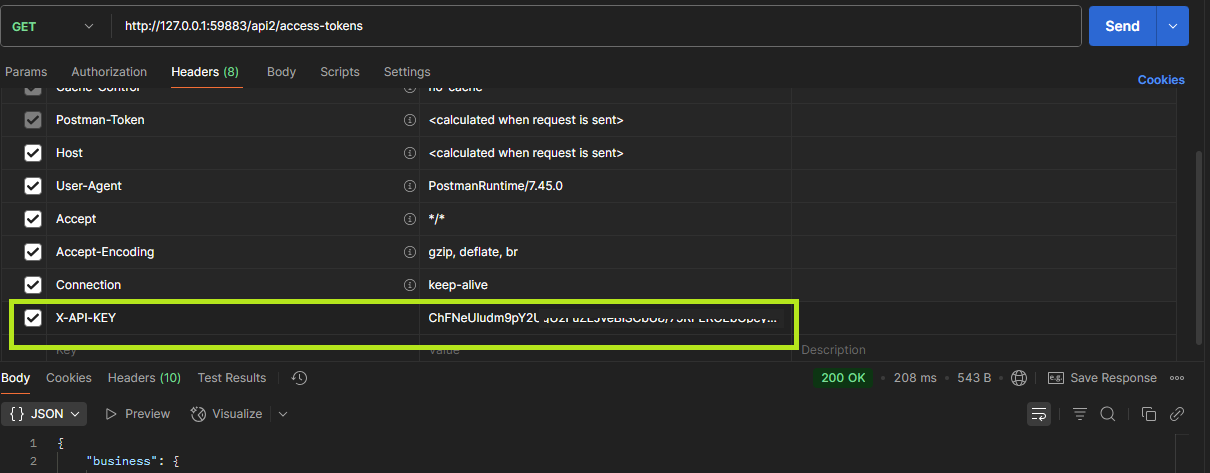
Manager’s Api2 does not use the standard Authorization header.
Instead, it requires an X-API-KEY header, where the value is the AccessToken generated within Manager.

curl -X 'GET' \
  'http://127.0.0.1:59883/api2/access-tokens' \
  -H 'accept: application/json' \
  -H 'X-API-KEY: ChFNeUludm9pY2Ug,,,,,,,,,n04uwbnsYU8Ro4b1F1E64iA='
var client = new HttpClient();
var request = new HttpRequestMessage(HttpMethod.Get, "http://127.0.0.1:59883/api2/access-tokens");
request.Headers.Add("X-API-KEY", "ChFNeUludm9pY2Ug,,,,,,,,,n04uwbnsYU8Ro4b1F1E64iA=");
var response = await client.SendAsync(request);
response.EnsureSuccessStatusCode();
Console.WriteLine(await response.Content.ReadAsStringAsync());

2 Likes

Hello @Mabaega
and super thank you for your kind support.

i have another thing

When I try to create a new Inventory Item using a POST request,
I get a response with 200 OK and a JSON object,
but the new item does not appear in my business data.
In the History, I only see “Tabs created” without actual product details being saved.

Here is an example of the request I tried in Postman:

POST https://{mybusiness}.manager.io/api2/inventory-items

Headers:
  X-API-KEY: <my token>
  Content-Type: application/json

Body (raw JSON):
{
  "Name": "API Test Item 001",
  "Code": "SKU-001",
  "SalesPrice": 150,
  "PurchasePrice": 100
}

Questions:

  1. What is the correct endpoint to create a new Inventory Item?

    • Should I use /tabs-form or /inventory-items?
  2. What are the required fields and their exact names (e.g. "Name", "Code", "SalesPrice", "PurchasePrice", etc.)?

  3. Is there any example in the documentation for posting new items to inventory-items?

I want to confirm the correct structure, because currently the API shows success (201/200) but no actual item is created.
Thank you for your support.

Go to the SwaggerNext Editor: https://editor-next.swagger.io/.
Then import the api2 URL of your business data:

https://{subdomain}.manager.io/api2

You will see all the endpoint paths provided by Manager.
Generate an access token in Manager and use it in Swagger as authorizations.

To create a new Inventory Item:

  1. First, manually create an Inventory Item in Manager.
  2. Save it, then open (edit) the item you just created.
  3. At the top-right of the form panel, you will find the UUID of the item.

Next, test it in Swagger:

  • Use the path GET /inventory-item-form/{key} with that UUID.
  • You will receive the JSON data of the item.

You can then reuse that JSON as the request body (payload) when creating a new item using the path: POST /inventory-item-form.

1 Like

thank you for the kind support !