Re: fixed assets. (Manager version: 27.7.12.2494 - latest as of today)
I’m trying to move a small USA business’s records from GnuCash to Manager, starting with year-end 2024 balances, so all of 2025 will be in Manager. The accounting records are kept on a tax basis, so depreciation is recorded in the software as calculated on the tax return, not based on a fixed percentage or other method. Depreciation is only entered one time for each fiscal year - after the tax return is done (dated Dec 31, YYYY).
(1) I would like to know how to set up the chart of accounts and handle the accounting, i.e., will plain old journal entries be best to record depreciation?
In GnuCash under “EQUIPMENT” (which will be a control account in Manager, I think), there are subgroups:
(1) Cost of equipment placed in service in 2022
2022-001 Name of 1st piece of 2022 equipment
2022-002 Name of 2nd piece of 2022 equipment
(2) Accumulated depreciation or Section 179 expense on equipment placed in service in 2022 [N. B. Section 179 = immediate expensing of capital items under USA tax system].
2022-001 AccDep Name of 1st piece of 2022 equipment
2022-001 AccDep Name of 2nd piece of 2022 equipment
(2) There is another subgroup in GnuCash called “EQUIPMENT AGGREGATION UNTIL PLACED IN SERVICE” (like construction in progress). It has actual ledger accounts that are specific to a given asset that is being built or assembled. I assume those aggregation accounts could just be a regular Fixed Asset account, and then via Journal Entry amounts can be moved from there to specific Fixed Asset accounts when the items are placed in service. Any best practices or anything I should know about that process?
You can use Fixed Assets and Depreciation Entries tabs.
For fixed asset categories like equipment, vehicles, etc, you should use Control Accounts > Fixed Assets so you got that part right.
For multiple accumulated depreciation accounts, you can use Control Accounts > Depreciation Entries, if you find that useful.
However, you don’t need to create any other chart of account entries to detail these categories, it will not work. Instead, you should create separate entries in Fixed Assets tab and assign them to their related Control Accounts for both cost and depreciation.
After doing that, you will be able to see the fixed asset NBV from your Fixed Assets tab or from Reports.
You can create a normal Chart of Accounts entry for that and you can transfer the balance once finished using Journal Entries.
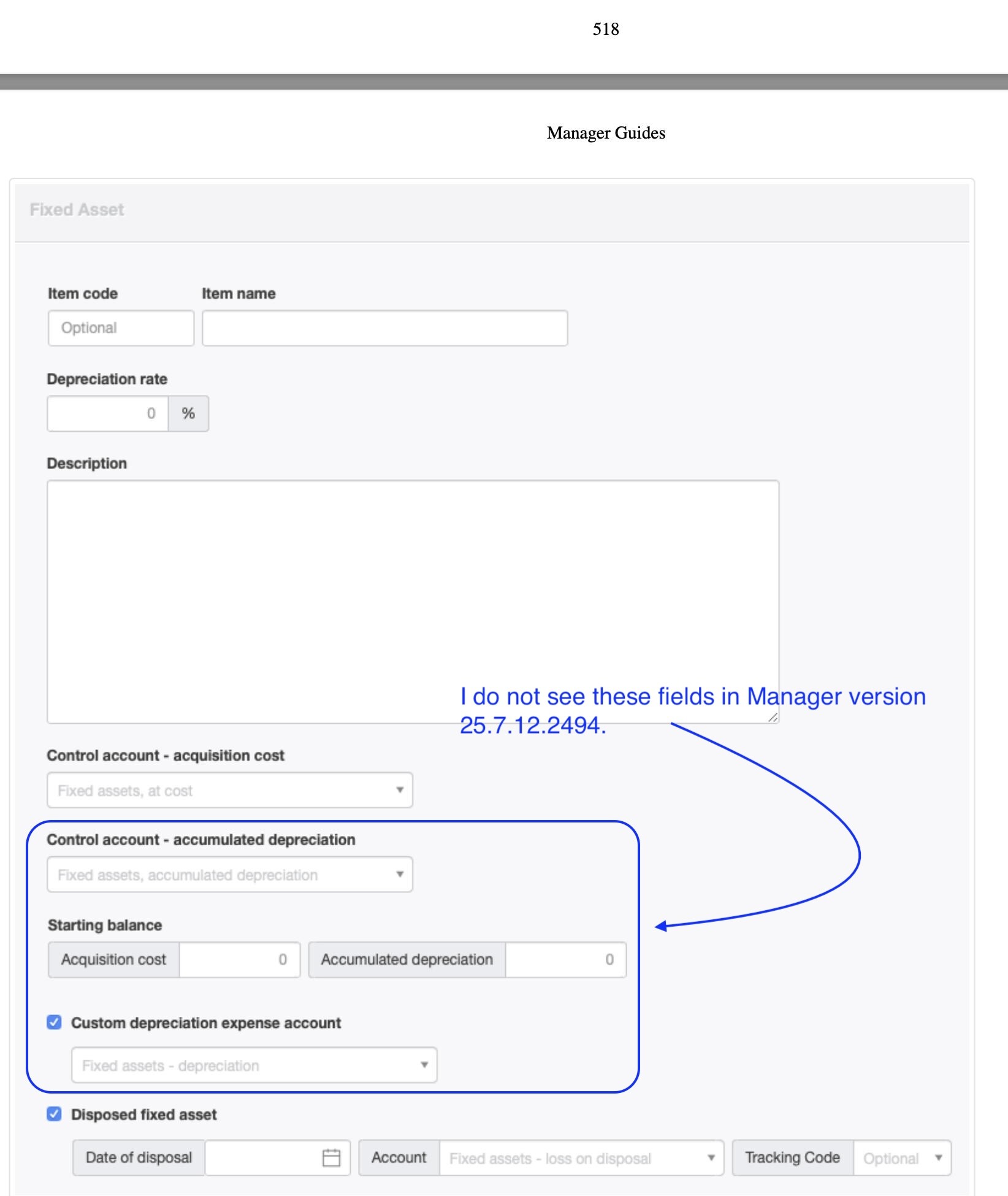
That helps. Thanks. I’m now trying to enter in the first fixed asset (the control account is set up and the subaccount). But I do not understand how to set the beginning balances. This Guide data (https://www2.manager.io/guides/15718) should tell me, but when I click on “Edit” there are no beg. balance and accumulated depreciation fields I can edit. I think part of the problem is that I cannot see the screenshots of Manager that are apparently in the Guide.
Thank you. The Sept. 2023 PDF has screenshots that have fields that the current 2024 July 12 version of Manager does not. Here’s what I see in the PDF:
So far so good but how do I set the start date ? and the amount ends up in retained earnings so do I journal it out to funds introduced? in the captial account
Forgot to add version is 26.6.7.3638 desktop windows 11 64bit
I was really talking about starting balances , I ended up journaling them in as well. I do use the depreciation as I use diminishing value not straight line so it works for me well it did last year hopefully it does this year as I need to do all my clients depreciation