# Custom Reports Print Bug
**URL:** https://forum.manager.io/t/custom-reports-print-bug/65572
**Category:** Uncategorized
**Created:** [October 8, 2025, 5:58am UTC](https://forum.manager.io/t/custom-reports-print-bug/65572 "2025-10-08T05:58:25Z")
**Posts on this page:** 5
**Page:** 1
### Author:  [@dram](https://forum.manager.io/u/dram)
#### Post date: [October 8, 2025, 5:58am UTC](https://forum.manager.io/t/custom-reports-print-bug/65572/1 "2025-10-08T05:58:25Z")
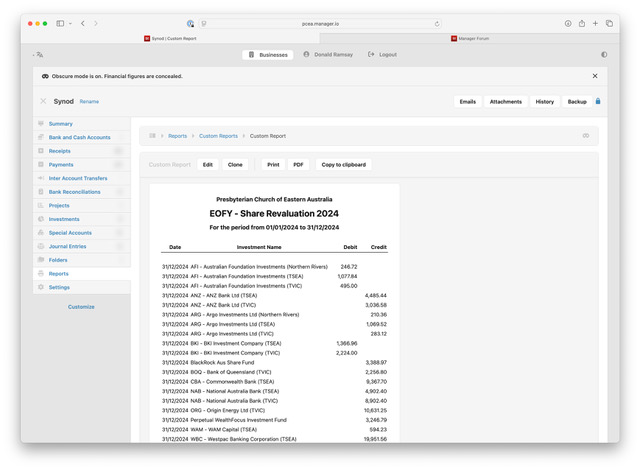
Custom reports do not print correctly from the PRINT button.
Using the PRINT button causes the entire page, including the left menu bar, to be printed rather than the report itself. The PDF button appears to be working correctly.
---
### Author:  [@Syed\_Salman\_Ali](https://forum.manager.io/u/Syed_Salman_Ali)
#### Post date: [October 8, 2025, 6:05am UTC](https://forum.manager.io/t/custom-reports-print-bug/65572/2 "2025-10-08T06:05:46Z")
@dram please share screen shot so it will be easy to sort out, both (Print & PDF) functions are working fine at my hand (Cloud Version).
---
### Author:  [@dram](https://forum.manager.io/u/dram)
#### Post date: [October 8, 2025, 8:12am UTC](https://forum.manager.io/t/custom-reports-print-bug/65572/3 "2025-10-08T08:12:58Z")
I am using the Cloud edition on Macos.
The blur button is not working either. See screenshot.
Donald
(Attachment Custom Report - Print Button.pdf is missing)
(Attachment Custom Report- PDF button.pdf is missing)
[details=“(attachments)”]
[/details]


---
### Author:  [@lubos](https://forum.manager.io/u/lubos)
#### Post date: [October 11, 2025, 12:16am UTC](https://forum.manager.io/t/custom-reports-print-bug/65572/4 "2025-10-11T00:16:48Z")
Fixed in the latest version (25.10.11)
---
### Author:  [@dram](https://forum.manager.io/u/dram)
#### Post date: [October 11, 2025, 1:18am UTC](https://forum.manager.io/t/custom-reports-print-bug/65572/5 "2025-10-11T01:18:00Z")
Thanks @lubos ,
Your quick fix is much appreciated.
While it is not an issue for me, the **obscure** mode appears to work everywhere except within Reports.
Regards,
Donald